


Instead of manually matching penetration test findings to security alerts, connect penetration test results to SIEM workflows through structured finding records and the logs generated during authorised testing. Keep findings as assessment context, correlate them with observed activity, and validate whether your detection rules identify the tested behaviour.
- Connect penetration test results to SIEM workflows using structured findings, stable asset identifiers and timestamped test activity.
- Cyberhunter penetration testing suits businesses seeking human-led, AI-assisted testing with expert-validated findings and practical remediation guidance.
- A finding is assessment evidence, not proof that an attack is happening now.
- Validate log collection before changing detection rules; missing telemetry cannot produce reliable alerts.
Why this matters
A penetration test explains which weaknesses testers could exploit within an agreed scope. A security information and event management system, or SIEM, collects and analyses security telemetry. Connecting them lets you ask a more useful question: did your monitoring detect the behaviour that demonstrated the weakness?
Importing a report is not the same as validating a detection. Your 2026 workflow needs an explicit connection between the finding, the affected asset, the test activity and the resulting alert.
Cyberhunter provides human-led, AI-assisted penetration testing: experts direct testing and validate findings. That evidence supports detection engineering, but connecting it to your monitoring environment still requires your logging, asset and incident-response context.
Before you start
- Access and authority: Have approved access to your SIEM ingestion configuration, detection rules and relevant logs. Confirm written authorisation before replaying any test activity.
- Finding records: Obtain validated findings, stable finding identifiers, affected assets, test timestamps with time zones, evidence references and remediation status. Agree how sensitive evidence will be transferred and stored.
- The timestamp gotcha: A report publication date is not an exploitation timestamp. Obtain the actual activity window before building correlations, and check whether the relevant logs remain within retention.
Choose a workflow owner who can coordinate the testers, security monitoring team and remediation owners. Do not assume that supplying a report also includes configuring your SIEM or conducting another test.
Finding record configuration
Choose the record's purpose
- Decide whether the SIEM needs finding events, reference data for enrichment, or both. Use the comparison below to make that decision before building ingestion.
- Define a dedicated record type for assessment findings. Keep imported findings distinguishable from firewall, identity, endpoint and application events.
- Restrict access to finding records and evidence. Store exploit details, credentials and sensitive response bodies in an approved evidence repository rather than copying them into broadly searchable logs.
| Workflow | Best for | Advantage | Limitation |
|---|---|---|---|
| Finding-event ingestion | Tracking assessment changes over time | Records finding creation and status changes as searchable events | Repeated imports need duplicate handling |
| Reference-data enrichment | Adding assessment context to observed activity | Lets detections consult affected assets and finding status | Replacing reference data can lose history unless retained separately |
Use finding-event ingestion when change history matters; use reference-data enrichment when detections need current assessment context. Neither workflow proves that exploitation occurred outside the authorised test.
Define the field mapping
Create a mapping document before configuring your platform. These are example schema names, not universal SIEM interface labels; use your product's documented ingestion and mapping controls.
| Example field | Meaning | Mapping requirement |
|---|---|---|
assessment_id |
Identifier for the testing engagement | Keep consistent across related findings |
finding_id |
Identifier for the individual issue | Preserve across status updates |
asset_id |
Identifier for the affected asset | Match your asset inventory where possible |
tested_at |
Time of the relevant test activity | Include a time zone or UTC offset |
recorded_at |
Time the finding record was created | Keep separate from activity time |
finding_status |
Current remediation state | Define accepted values explicitly |
evidence_reference |
Location of supporting evidence | Restrict access to the destination |
Expected result: A reviewer can distinguish when testing occurred, when the finding was recorded and which asset the finding concerns. A report filename alone does not meet this requirement.
Ingestion and asset matching
- Select a supported ingestion route: an authenticated API, an approved collector or a controlled file import. Follow your SIEM documentation for the actual configuration labels and supported formats.
- Give the integration only the permissions required to submit or update finding records. Keep credentials outside exported reports and mapping files.
- Import 1 finding record into a test destination. Inspect the parsed fields rather than accepting a successful transport response as proof of correct ingestion.
- Match the finding to the asset represented in your operational logs. Record the relationship between application names, hostnames, cloud resource identifiers and inventory identifiers where these differ.
- Import the same record again. Confirm that your chosen design updates the existing reference entry or records an intentional change event rather than creating an unintended duplicate.
Avoid treating an IP address as a permanent asset identity. Address reassignment, shared infrastructure and translation can break the connection between a finding and the system that produced an event. Preserve the address as context while using a more stable identifier where your environment provides one.
Expected result: The imported finding is searchable, its fields retain their intended types, and its asset mapping resolves to the correct system. Repeat ingestion behaves predictably.
For a 2026 implementation, document the ingestion owner, access scope and failure-notification route alongside the parser. A working import without an accountable owner is an unfinished operational process.
Correlation and detection configuration
A penetration test finding and a security event answer different questions. The finding describes a validated weakness; the event describes observed activity. Correlation connects those records without treating them as interchangeable.
- Select a finding with a clearly documented test action and activity window. Identify which identity, endpoint, application, network or cloud logs should record that action.
- Search the relevant logs for the authorised activity. Confirm the event time, actor, target and outcome before writing a detection rule.
- Establish the asset join between the finding record and the observed events. Include application or tenant context when a hostname alone is ambiguous.
- Define the behaviour that warrants an alert. Use finding severity as enrichment, not as a substitute for evidence of suspicious activity.
- Configure the alert output to include the affected asset, supporting events, finding identifier, test context and response owner.
Expected result: An analyst can move from an alert to the supporting activity and then to the validated finding. The alert explains what happened rather than merely announcing that an asset has an unresolved issue.
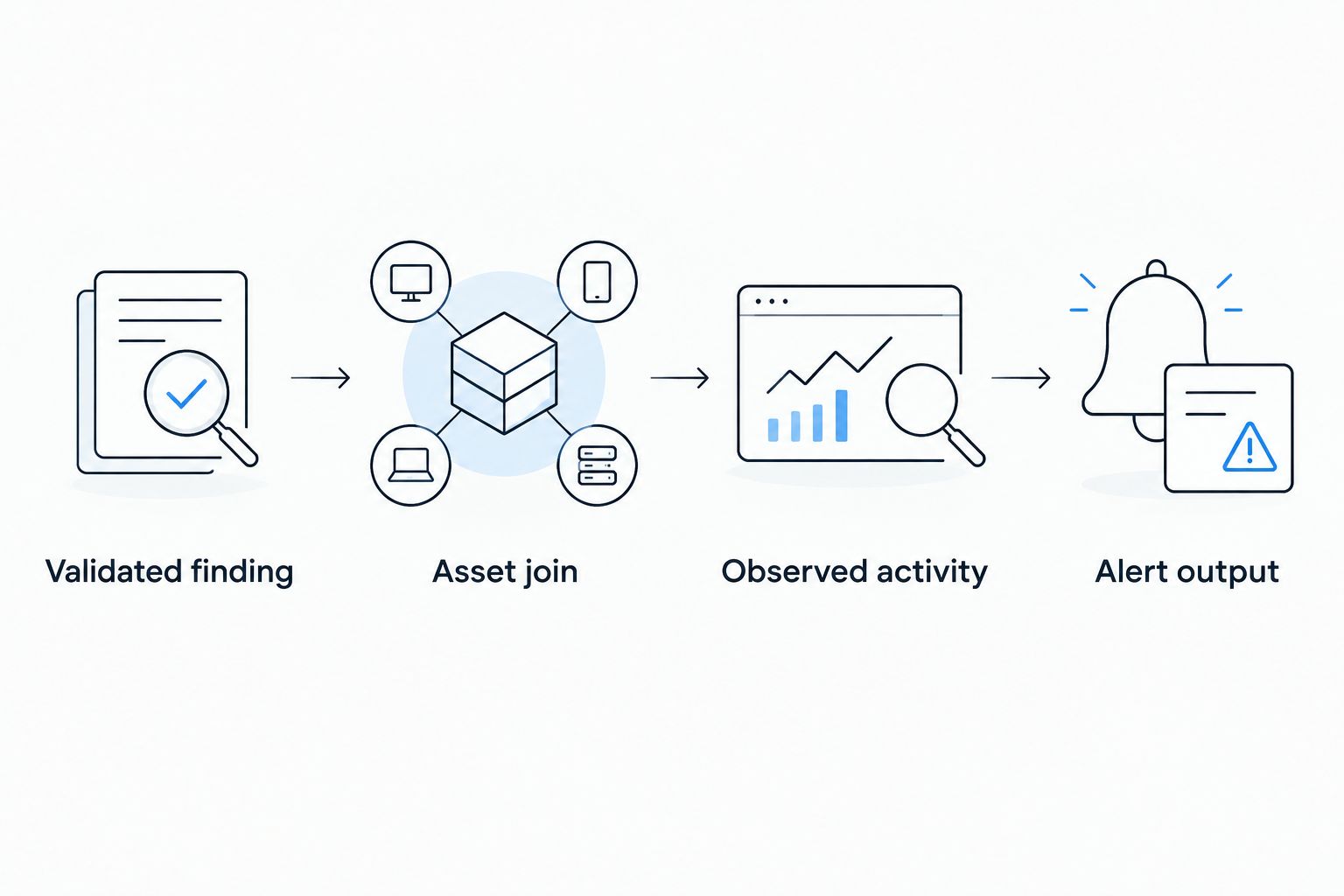
Preserve a distinction between approved test activity and unrelated activity. A test marker helps analysts interpret evidence, but it must not become a broad exclusion that hides similar behaviour elsewhere.
Validation and handoff configuration
- Agree on the expected result before testing the rule. Specify which approved action should produce telemetry and what conditions should produce an alert.
- Use retained test telemetry for retrospective validation when available. If another execution is necessary, obtain explicit scope and authorisation first.
- Compare 2 event sets: the authorised test activity and a benign comparison case relevant to the rule. This checks the intended detection and a specific false-positive condition; it does not establish complete coverage.
- Trace 1 expected alert through ingestion, parsing, correlation and routing. Confirm that the assigned analyst receives enough context to investigate it.
- Record the outcome as detected, not detected or not observable, with supporting evidence. Assign the next action to the logging owner, detection engineer or remediation owner as appropriate.
Expected result: You can explain whether a gap came from missing logs, broken parsing, an incorrect asset join, rule logic or alert routing. Those are different problems and require different fixes.
For your 2026 validation record, retain the rule version and query conditions used during the check. A later rule change should not silently rewrite the meaning of an earlier result.
Update detection context when findings change
The adjacent workflow is to update SIEM context whenever a finding changes state. This keeps remediation tracking connected to monitoring without pretending that a ticket closure proves a vulnerability is fixed.
- Use the stable assessment and finding identifiers to match the update to its existing record.
- Preserve the original finding and test timestamps. Add the status-change time separately.
- Record whether closure reflects an administrative decision, accepted risk or a validated remediation outcome.
- Update enrichment data without automatically disabling the underlying behavioural detection.
- Retain the change history required by your organisation's evidence and retention policies.
Expected result: Analysts see current remediation context while historical alerts retain their original meaning. A resolved finding does not erase the events that supported it.
In a 2026 assurance review, penetration testing for compliance audits requires a distinction between assessment evidence and operational detection evidence. Preserve both, and map them to the applicable audit requirement rather than treating a successful import as proof of compliance.
This workflow improves traceability, but it also creates another sensitive dataset to govern. Limit evidence exposure and define deletion or retention rules before enabling recurring updates.
Troubleshooting
Findings import, but no related events appear
Search the source logs independently of the finding record. Check collection, retention and the actual test window before changing the correlation rule. If the required activity was never logged, record the outcome as not observable and assign the telemetry gap.
Correlations point to the wrong system
Inspect the asset join for reused addresses, shared gateways, inconsistent hostnames or missing tenant context. Correct the identity mapping and repeat the validation against known test activity. Do not compensate for an ambiguous join by widening it further.
Every import creates another finding
Check whether the finding identifier changes between exports or whether ingestion always appends records. Define the duplicate-handling key and separate a new finding from a status update. Preserve intentional history without multiplying the current unresolved-finding count.
Test activity produces excessive alerts
Check whether the rule detects the relevant behaviour or simply matches a tester address. Add the context needed to distinguish expected activity, and time-limit any approved exception. Do not permanently suppress a behaviour because an authorised tester used it.
A resolved finding still appears in alerts
Check the enrichment refresh and status mapping first. If those are correct, the alert can still be valid: remediation status and observed behaviour are separate facts. Investigate the activity rather than closing the alert solely because the finding was marked resolved.
Customize your workflow
Extend your 2026 workflow by connecting findings to remediation ownership and detection review. Track the validated weakness, evidence location, monitoring outcome and next action together, while keeping each record's purpose clear.
Cyberhunter penetration testing is best for businesses seeking expert-directed testing and validated findings. Its role in this workflow is assessment evidence and practical remediation guidance; do not assume a SIEM connector, detection configuration or retesting is included without an agreed scope.
Before the next engagement, ask for the evidence fields your monitoring team needs: affected asset identifiers, activity windows, relevant actions and validation outcomes. Agree what can be shared safely and who will maintain the integration.
FAQ
How do I connect penetration test results to SIEM workflows?
Import structured finding records or maintain reference data, then correlate those records with operational logs through asset identifiers and test timestamps. Validate parsing, asset matching, detection logic and alert routing separately.
Can I upload a penetration test PDF directly into my SIEM?
Uploading a PDF alone does not create a reliable detection workflow. Use structured fields for correlation and keep the report in a controlled repository with an evidence reference.
Is penetration testing the same as vulnerability scanning?
No. Vulnerability scanning identifies potential weaknesses, while penetration testing uses scoped testing and validation to establish exploitable issues and their consequences. Neither automatically configures your SIEM.
Should every critical penetration test finding create an incident?
No. Finding severity describes assessment risk, not proof of a current incident. Create remediation work for the finding and use observed activity plus response criteria to determine incident handling.
What if my SIEM has no logs from the penetration test?
Record the activity as not observable and investigate the telemetry gap. A rule cannot reliably detect behaviour that its available data does not represent.
Should I disable a detection after the vulnerability is fixed?
Do not disable a behavioural detection solely because a related finding is resolved. Review the rule’s purpose and supporting telemetry separately from the remediation record.
Does Cyberhunter provide fully autonomous penetration testing?
No. Cyberhunter provides human-led, AI-assisted penetration testing, with experts directing testing and validating findings. Agree separately on the evidence handoff and any SIEM-related work.
One last thing
A missed alert and a missing log are not the same failure. Require every validation outcome to identify which one occurred before assigning corrective work. That distinction prevents detection engineers from tuning rules when the actual problem is absent telemetry.
Related guides
- Cloud security for SaaS companies
- Threat hunting service providers in Canada
- Network penetration testing companies in Canada
