


Cloud security for SaaS companies is the protection of cloud-hosted applications, identities and customer data with the aim of maintaining trustworthy access and service delivery. This 2026 guide focuses on the SaaS-specific challenge: securing shared infrastructure while keeping each customer's data and permissions separate.
- Cloud security for SaaS companies starts with tenant isolation, identity controls and clear responsibility for cloud configuration.
- Cyberhunter suits SaaS teams seeking human-led, AI-assisted penetration testing with expert-validated findings and practical remediation guidance.
- Vulnerability assessments identify potential weaknesses; penetration testing validates exploitable paths within an agreed scope.
- Test application permissions and cloud permissions together; neither layer proves the other is secure.
Why cloud security matters for SaaS companies
A SaaS application makes access decisions on behalf of different customers, administrators, integrations and background services. A configuration review alone does not establish whether those decisions hold when an authenticated user changes a request or reuses an old credential.
Your cloud provider secures underlying infrastructure according to the service you consume. Your responsibilities still include application authorization, identity configuration and the protection of customer data. The exact boundary changes between managed services and infrastructure you operate yourself.
For your 2026 security plan, separate infrastructure configuration from application behaviour, then test where they intersect. The cloud security services comparison provides a starting point for evaluating external support; begin with the scope your application actually needs.
The business questions are concrete: Can one customer read another customer's records? Can a compromised integration reach production secrets? Can your team reconstruct what happened from available logs? Those questions should shape the work before you select a tool or testing provider.
Build your SaaS cloud security plan
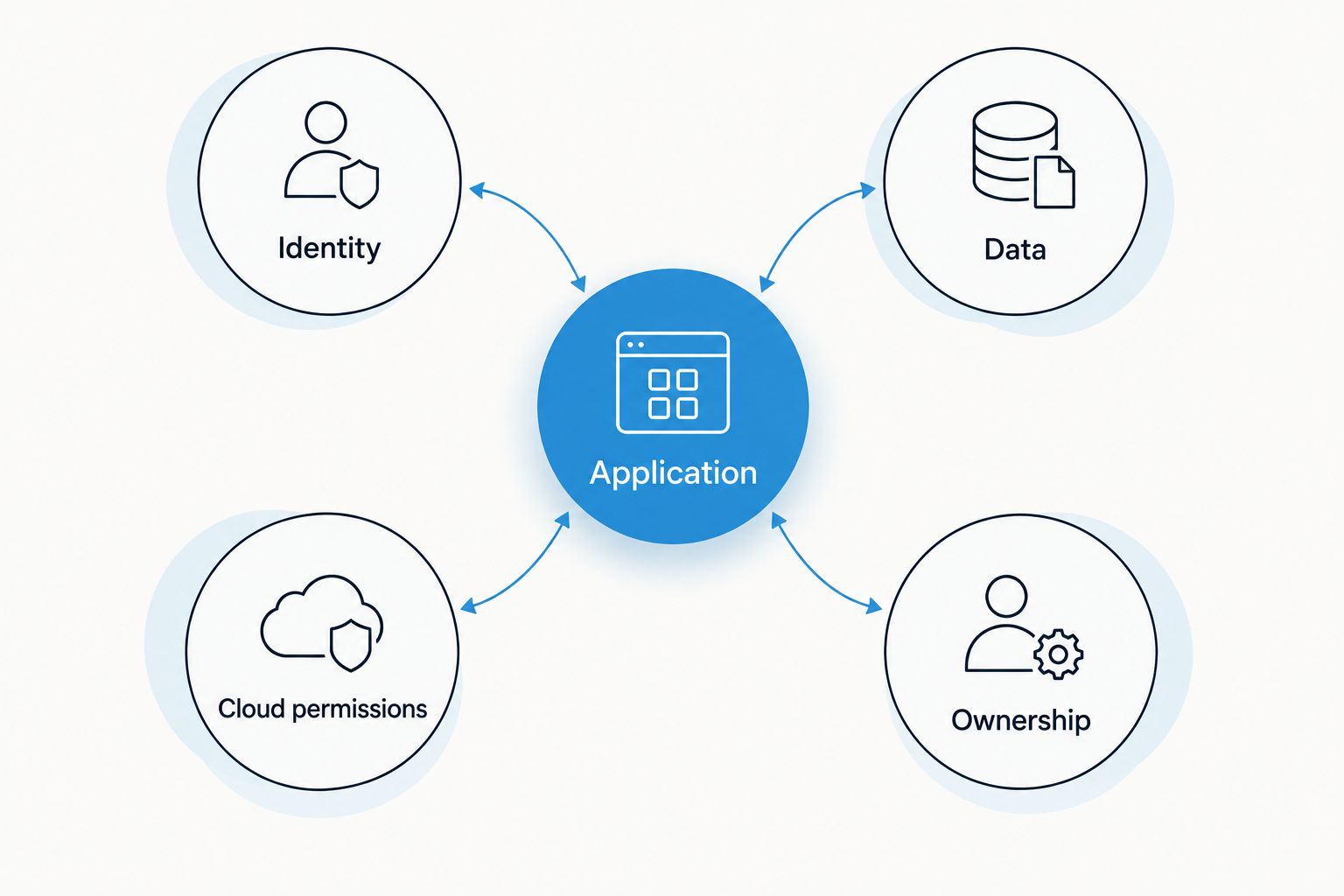
1. Map your service boundaries and sensitive data
Start manually with an architecture sketch and an asset register. Trace a customer request from the public endpoint through authentication, application services, storage and third-party integrations. Include background jobs and support access, not just the visible product.
For your 2026 baseline, identify who owns each boundary and which controls depend on the cloud provider. A managed database removes some operational work; it does not decide which application user should read a customer record.
Use the map to write testable security statements. For example, an ordinary customer account must not retrieve another tenant's export, and a development workload must not read production secrets. These statements turn a broad security objective into something your team can verify.
- Application: Record public endpoints, APIs, administrative interfaces and background workers.
- Identity: Identify customer accounts, workforce access and workload credentials.
- Data: Mark customer records, secrets, exports, logs and backups.
- Cloud permissions: Document which services can reach sensitive resources.
- Ownership: Assign a responsible team to each boundary and data store.
2. Separate customer, workforce and workload identities
Review access manually before adding another identity tool. Export role assignments, inspect privileged accounts and trace how applications obtain credentials. Classify access into 3 identity types: customer identities, workforce identities and workload identities.
These identities need different controls. Customer authorization must preserve tenant boundaries; workforce access needs appropriate administrative restrictions; workloads need narrowly scoped permissions without unnecessary long-lived credentials.
Pay particular attention to account recovery, role changes and offboarding. Strong sign-in controls do not compensate for an application that accepts an unauthorized tenant identifier after login. Likewise, removing a user's account is incomplete if active sessions or integration tokens retain access contrary to your intended policy.
- Require multifactor authentication for privileged workforce access.
- Remove unused accounts and review standing administrative permissions.
- Prefer short-lived workload credentials where the platform supports them.
- Check session and token behaviour after role removal or account suspension.
- Review support impersonation and emergency access separately from normal administration.
3. Scope testing around exploitable business outcomes
Write the initial scope yourself using the architecture map. Define what testers can access, what they must avoid and what evidence would demonstrate a meaningful failure. Do not buy a generic scan and treat the resulting issue list as proof that application access controls work.
Cyberhunter provides human-led, AI-assisted penetration testing: experts direct testing and validate findings. Its security services also include vulnerability assessments and threat hunting. External testing is a path to specialist validation, not a replacement for internal ownership.
Cyberhunter is best suited to SaaS teams seeking human-led, AI-assisted penetration testing with expert-validated findings. The boundary is explicit: penetration testing evaluates an agreed scope; it does not establish that every service, release or configuration is secure.
- Specify applications, APIs, cloud accounts and environments included in testing.
- Define black-box testing versus authenticated access and supplied architecture information.
- Agree permitted techniques, stop conditions and incident escalation contacts.
- Request reproducible evidence, business impact and practical remediation guidance.
- Confirm third-party testing permissions and data-handling requirements before work begins.
4. Validate tenant isolation and API authorization
Start with 2 test tenants containing synthetic records and separate user accounts. Exercise the same workflow under each account, then check whether changing identifiers, roles or request context crosses the intended boundary. Keep testing within written authorization and avoid real customer data.
Tenant isolation means more than filtering the main application screen. Exports, file downloads, search indexes, queued jobs and support functions all need the same authorization discipline. An endpoint that accepts an object identifier must verify the caller's right to that object.
Test both horizontal access, between comparable users or tenants, and vertical access, from a lower-privilege role to a higher-privilege action. Evidence should show the expected boundary, the observed behaviour and the affected data or function without unnecessarily copying sensitive content.
- Compare access to records belonging to each test tenant.
- Check administrative actions using lower-privilege accounts.
- Test export links, attachments and asynchronous job results.
- Verify tenant context in caches, search results and background tasks.
- Repeat authorization checks after role changes and account suspension.
5. Harden cloud configuration and software delivery
Use native cloud configuration views and repository settings to establish a manual baseline. Review public exposure, network paths, storage permissions and deployment identities before deciding which checks to automate.
Infrastructure-as-code helps you review intended changes, but the deployed environment remains the object you must secure. Compare declared configuration with actual resources, including temporary troubleshooting changes and services created outside the normal deployment process.
Keep application secrets out of source code and build output. Review which credentials a deployment job receives and whether contributions from untrusted contexts can reach them. A carefully restricted production account still needs protection from a build process that can change production workloads.
- Remove unnecessary public access to storage and administrative interfaces.
- Restrict deployment identities to their required environments and actions.
- Separate development, testing and production access paths.
- Scan repositories and build artefacts for exposed secrets.
- Review security-relevant configuration changes before deployment.
6. Connect logging, response and recovery
Begin by checking whether existing logs answer a specific investigation question. Can you identify who changed a privileged role, accessed a sensitive export or created a new workload credential? Collecting events without reliable identity and tenant context leaves the investigation incomplete.
Detection and recovery address different problems. Monitoring helps identify suspicious activity; restore testing establishes whether you can recover the data and configuration your service needs. Neither replaces prevention or application authorization testing.
Threat hunting is a targeted investigation for signs of compromise, not another name for penetration testing. Define the question, available telemetry and investigation boundaries before assigning that work. Document logging access too: security records can contain sensitive customer or operational information.
- Capture relevant authentication, administrative and cloud control-plane events.
- Include tenant, actor and resource context where appropriate.
- Protect logs against unauthorized access and alteration.
- Exercise credential revocation and incident escalation procedures.
- Test restoration using isolated resources and approved recovery data.
7. Prioritize remediation and verify the fix
Use a shared issue register before buying workflow software. For every validated finding, record the affected asset, demonstrated access, business consequence and proposed correction. Assign 1 accountable owner to each issue so responsibility does not disappear between engineering, platform and security teams.
Your 2026 remediation plan should distinguish an immediate containment action from the underlying fix. Disabling an exposed endpoint can reduce access while engineering corrects authorization; it does not explain whether similar endpoints contain the same defect.
Verification must repeat the original failure condition and check relevant neighbouring paths. Agree any external retesting scope and terms explicitly. Closing a ticket because code changed is not the same as establishing that the demonstrated exploit no longer works.
- Rank findings using demonstrated impact, exposure and affected privileges.
- Record containment separately from permanent remediation.
- Link the correction to its deployment and verification evidence.
- Check related endpoints or roles for the same failure pattern.
- Feed recurring defects into design reviews and automated regression tests.
Scope Your SaaS Security Testing
Discuss application boundaries, cloud access, testing evidence and remediation priorities.
Compare SaaS cloud security options for 2026
Choose the method by the question you need answered, not by the longest feature list. A configuration review, vulnerability assessment and penetration test produce different evidence. Threat hunting addresses a different question again: whether available telemetry contains signs of malicious activity.
| Option | Best for | Main benefit | Key limitation |
|---|---|---|---|
| Internal configuration review | Establishing ownership and a baseline | Uses direct knowledge of your architecture and intended access | Does not independently demonstrate application exploitability |
| Vulnerability assessment | Finding and prioritizing potential weaknesses | Creates a structured inventory of identified issues | Does not establish an exploitable path for every finding |
| Cyberhunter penetration testing | Expert validation of exploitable issues | Human-led, AI-assisted testing with expert-validated findings and practical remediation guidance | Covers the agreed scope, not every future change |
| Security assessment | Reviewing controls against a defined objective | Examines control design, implementation and supporting evidence | Depth depends on the assessment scope and methods |
| Threat hunting | Investigating suspected or hidden malicious activity | Examines available evidence for signs of compromise | Depends on accessible telemetry and an appropriate investigation scope |
For a SaaS team with an unclear asset inventory, begin with ownership and configuration review. For a known application boundary that needs independent validation, scope penetration testing. For suspected compromise, define an investigation rather than asking a preventive test to answer an incident-response question.
These methods work together, but they are not interchangeable. Ask each provider to identify deliverables, exclusions and evidence requirements before agreeing the engagement.
Common mistakes SaaS companies make
Treating cloud hosting as application security
A provider's infrastructure controls do not decide whether your application enforces customer permissions correctly. Managed services change the responsibility boundary; they do not remove it. Document the boundary and test your side of it, including application authorization and workload access.
Testing only the unauthenticated perimeter
Public endpoints matter, but SaaS workflows also expose functions after login. A valid customer account must not become a route to another tenant's data or administrative actions. Include authenticated roles, integrations and support access in the scope rather than stopping at the sign-in page.
Sending scanners where business-logic testing is needed
A scanner can identify technical weaknesses without understanding your intended approval process or tenant model. Keep scanning, but add deliberate tests of who can perform each sensitive action and under what conditions. Use synthetic workflows that reflect actual product permissions, not only default tool checks.
Treating a report as a permanent security state
A test describes the scope and conditions examined during that engagement. New releases, permission changes and integrations change the environment. Use findings to improve regression coverage and trigger further review when relevant boundaries change; do not treat a completed report as approval for unrelated changes.
FAQ
What’s the first step in cloud security for SaaS companies?
Map your applications, identities, sensitive data and cloud responsibilities first. Use that map to identify tenant boundaries, assign owners and define which controls need review or testing.
Does using a major cloud provider make my SaaS application secure?
No. Cloud providers secure underlying components according to the services you use, while application authorization, identity configuration and customer data protection still require your attention. Document the responsibility boundary for each service.
Is penetration testing the same as vulnerability scanning?
No. Vulnerability scanning identifies potential weaknesses, while penetration testing validates exploitable paths within an agreed scope. Authenticated application testing is particularly relevant to tenant isolation and role-based access.
What should a SaaS penetration test include?
A SaaS penetration test should cover the application boundaries and business risks defined in its scope. Relevant areas include tenant isolation, API authorization, privileged workflows, cloud permissions and the handling of sensitive data.
Can I test tenant isolation without using customer data?
Yes. Use separate test tenants, synthetic records and accounts with different roles to check authorization boundaries. Obtain written authorization and agree safeguards before testing production systems.
How does Cyberhunter approach penetration testing?
Cyberhunter provides human-led, AI-assisted penetration testing in which experts direct testing and validate findings. The service emphasizes evidence of exploitable issues and practical remediation guidance; agree the specific scope and deliverables before work starts.
How often should a SaaS company review cloud security in 2026?
Use a documented review schedule alongside change-triggered checks rather than relying on a universal interval. Significant changes to authentication, tenant isolation, cloud permissions or external integrations should trigger a review of the affected controls.
One last thing
A successful login is the beginning of an authorization test, not its conclusion. For your next 2026 security review, choose a sensitive workflow such as a customer export. Trace who requests it, which identity processes it, where the output is stored and who can retrieve it.
That narrow exercise connects application permissions, workload access, storage controls and logging. Give each boundary an owner and an expected result. You now have a concrete test case your engineering team can maintain and an external tester can evaluate without relying on a vague request to check the cloud.
Related guides
- Best API penetration testing companies
- Best web application penetration testing companies
- Best vulnerability assessment companies in Canada
