


Instead of manually reconciling HIPAA risk-analysis documents, penetration-test reports and remediation tickets, connect them through a shared evidence register that tracks each finding from scope approval to verified closure. This 2026 HIPAA compliance penetration testing workflow turns technical results into documented risk decisions without treating a test report as proof of compliance.
- HIPAA compliance penetration testing connects risk analysis, authorized testing, remediation and verification; a penetration test alone does not establish compliance.
- Cyberhunter provides human-led, AI-assisted penetration testing with expert-validated findings and practical remediation guidance.
- Scope electronic protected health information, access boundaries and third-party responsibilities before testing starts.
- Close findings with verification evidence, not simply a completed remediation ticket.
Why this matters
HIPAA security work starts with understanding risk to electronic protected health information, or ePHI. Penetration testing answers a narrower question: can an authorized tester exploit a weakness within an agreed scope, and what access does that weakness permit?
Cyberhunter penetration testing is best for teams seeking human-led testing and expert-validated findings. Its security services include penetration testing, vulnerability assessments and cyber threat hunting; these activities answer different security questions.
For your 2026 programme, keep the legal requirement separate from the testing method. The HIPAA Security Rule requires risk analysis and risk management under 45 CFR §164.308(a)(1)(ii)(A) and (B). Do not infer a universal penetration-testing frequency from those provisions or substitute a vendor report for the required organisational analysis.
Confirm applicable requirements, effective dates and contractual obligations with your privacy or legal adviser. This workflow supports security evidence management; it is not a legal determination of HIPAA compliance.
Before you start
- Authority and access: Identify the covered entity or business associate responsible for the environment. Obtain written testing authorization, asset-owner approval, suitable test accounts and any required third-party permissions.
- Working materials: Gather your ePHI inventory, data-flow diagrams, current risk analysis, previous findings and a restricted evidence repository. Assign a security lead, remediation owners and a risk-acceptance authority.
- The setup gotcha: Decide how testers will avoid collecting patient data before testing begins. Synthetic records, evidence-redaction rules and an escalation contact belong in the authorization package, not in an email after a sensitive record appears.
For the account-level example below, prepare 2 test accounts with different roles. Use 3 synthetic records to represent an account's own record, another user's record and a restricted administrative record. These are suggested setup materials, not HIPAA-prescribed quantities.
Choose the right validation method
A security assessment, vulnerability scan and penetration test are not interchangeable. Choose the activity that answers your actual question, then record what remains outside its coverage.
| Activity | Best for | Useful output | Limitation |
|---|---|---|---|
| Security assessment | Reviewing controls, responsibilities and documented security practices | Control gaps and improvement priorities | Does not necessarily demonstrate exploitation |
| Vulnerability scanning | Identifying potential known weaknesses across defined assets | Candidate vulnerabilities for investigation | Results need validation and do not establish business impact alone |
| Penetration testing | Validating exploitable weaknesses and access boundaries | Reproducible evidence and remediation guidance | Covers the agreed scope and testing period, not every possible weakness |
Cyberhunter's human-led, AI-assisted penetration testing places experts in charge of testing and finding validation. That supports technical validation, but it does not replace policy review, workforce controls, risk ownership or other HIPAA obligations.
Use scanning to identify candidates; use penetration testing to validate exploitability within authorization. Keep both outputs available, but do not give an unvalidated scanner alert the same evidentiary status as a demonstrated access-control failure.
Scope and authorization register
Create a controlled document or ticket template for the engagement. The bold labels below are suggested register fields, not buttons or settings in a particular application.
- Map the ePHI path. Record where ePHI enters, moves, resides and leaves the environment. Include relevant applications, APIs, identity systems, storage, integrations and administrative access paths. Identify who operates each component.
- Define the test boundary. Complete Assets, Environment, Permitted techniques, Exclusions and Third-party permissions. Specify whether testing includes authenticated access, external exposure, internal access or role separation. Black-box testing limits the tester's initial knowledge; it does not remove the need for authorization.
- Approve operating safeguards. Complete Testing window, Stop conditions, Escalation contact and Evidence handling. State whether production testing is permitted and whether disruptive activity is excluded. Confirm how defenders will distinguish authorized testing from an incident.
Expected result: An approved scope connects each test target to an ePHI-related risk question, a responsible owner and an explicit permission boundary.
Do not assume that permission to test your application includes permission to test its hosting provider or connected vendor. Record those boundaries before the engagement starts. For production systems, agree on non-destructive evidence thresholds and stop when the authorized objective has been demonstrated.
Finding and control mapping
Build the connection between technical findings and risk decisions before the report arrives. Your 2026 evidence register should preserve the distinction between observed behaviour, business impact and the safeguard under review.
- Define finding records. Create fields for Finding ID, Affected asset, Tested role, Observed behaviour, Evidence reference and Test date. Ask for enough detail to reproduce the issue safely without placing credentials or patient information in ordinary tickets.
- Validate business consequences. Record what the tester actually demonstrated: unauthorized record access, privilege escalation, exposed secrets or another confirmed outcome. Separate demonstrated access from untested follow-on possibilities. Ask what prerequisites an attacker would need.
- Map the relevant safeguard. Add Risk register reference, Relevant safeguard and Mapping rationale. For example, a demonstrated authorization failure warrants examination of access-control safeguards under 45 CFR §164.312(a). The mapping identifies a control question; it does not automatically establish a legal violation.
Expected result: Every accepted finding has traceable evidence, a business consequence and a reasoned connection to the organisation's risk analysis.
Keep scanner-only observations distinguishable from validated findings. If a test cannot proceed because the permitted account lacks access, record that coverage limitation rather than treating the untested area as secure.
For evidence storage, retain a restricted original and create a redacted working reference. Give remediation teams the information needed to fix the issue without distributing sensitive proof more widely than necessary.
Remediation and verification register
A report becomes operationally useful when each finding has an owner and a closure condition. The handoff must preserve the original evidence rather than reducing a technical weakness to a vague task such as improve security.
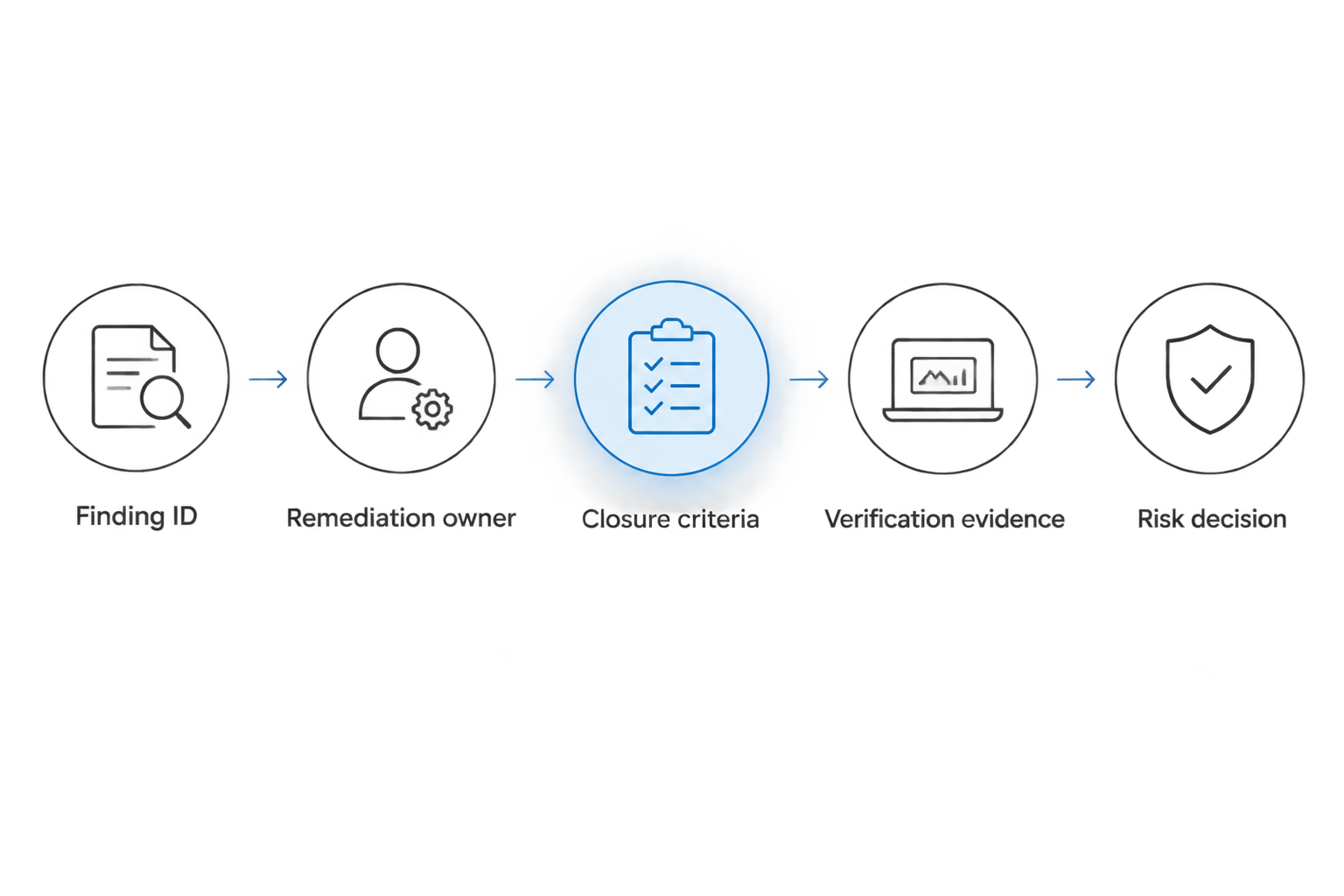
- Assign accountable work. Complete Remediation owner, Target date, Dependencies and Interim controls. Set urgency using demonstrated impact, exposure and existing safeguards, not the report's severity label alone. Assign 1 accountable owner per finding, even when several teams contribute.
- Define closure before implementation. Write Closure criteria as an observable outcome. For an authorization weakness, specify which role must be denied which action, on which record, while preserving legitimate access. Attach the implementation reference when the change is deployed.
- Verify and decide. Store Verification evidence, Verification date, Remaining exposure and Risk decision. Repeat the original test safely and examine relevant adjacent paths. If remediation is deferred, document the decision-maker, rationale, interim safeguards and review trigger.
Expected result: Each finding is verified as remediated, remains open with assigned work, or has a documented risk decision. A deployment notification alone is not closure evidence.
Use the penetration-test findings to remediation workflow to structure the engineering handoff. Agree on verification scope and commercial terms separately; do not assume a retest is included.
Evidence package and review gate
Your 2026 evidence package should let an authorized reviewer follow the chain without reconstructing it from meeting notes. Keep sensitive technical proof restricted while preserving references in the risk record.
- Assemble the trace. Connect the approved scope, report version, finding IDs, remediation records, verification evidence and risk decisions. Preserve dates and identify which environment each record describes.
- Check completeness. Confirm that every finding has a disposition and every disposition has supporting evidence. Review exclusions, failed test prerequisites and unresolved third-party dependencies separately from successful test results.
- Refresh the risk analysis. Evaluate whether findings change your understanding of threats, vulnerabilities, likelihood or impact. Record follow-up work and the events that require another review, such as a material architecture or access-model change.
Expected result: A reviewer can trace a risk from the affected system through testing, corrective action and the remaining exposure.
HIPAA documentation requirements under 45 CFR §164.316 include retaining required documentation for 6 years from creation or the date it last was in effect, whichever is later. Define which records constitute required documentation with your compliance adviser; do not apply that period indiscriminately to raw exploit files, secrets or unnecessary patient data.
Repeat the workflow after a material change
The adjacent workflow is change-driven validation. Instead of waiting for the next planned engagement, connect relevant changes to a security review that determines whether additional testing is needed.
For example, a new API, identity-provider change or revised user-role model can alter an ePHI access boundary. Add these checks to the change record:
- Changed boundary: Identify the assets, roles and data flows affected.
- Validation decision: Record whether configuration review, scanning, targeted penetration testing or another activity answers the new risk question.
- Evidence link: Attach the resulting assessment and connect any findings to the existing remediation register.
Best for: Teams changing applications or infrastructure that handle ePHI. The benefit is focused validation of changed exposure; the limitation is that targeted testing does not replace assessment of the wider environment.
Keep change-driven reviews alongside your broader 2026 risk-management schedule. Neither a calendar entry nor a successful deployment proves that access boundaries still work as intended.
Troubleshooting
The finding has no connection to ePHI
Document the actual affected asset and access path. Keep indirect infrastructure risks where the evidence supports them, but remove unsupported claims that patient data was exposed. A relevant security finding does not need an exaggerated consequence.
The tester cannot reproduce the issue
Compare the original role, environment, prerequisites and application version with the current setup. Preserve the original evidence and record whether a deployment changed the behaviour. Do not silently downgrade the finding because reproduction failed under different conditions.
Production safeguards block the planned test
Stop at the agreed boundary and consult the authorized contact. Use an approved alternative, such as a controlled environment or a narrower proof, and document what that alternative cannot establish about production.
The remediation ticket is closed but access still works
Reopen the finding and compare the implementation against its closure criteria. Check alternate endpoints, other affected roles and inherited permissions. Verification must test the security outcome, not merely confirm that a code change exists.
Sensitive evidence appears in an ordinary ticket
Restrict access promptly and follow your incident-handling process to assess the disclosure. Move necessary evidence into the approved repository, replace broad ticket attachments with restricted references and review who accessed the material.
Customize your workflow
Start with the ePHI access boundary that your current risk analysis identifies as consequential. Expand the scope only when ownership, authorization and verification are clear; a longer asset list is not a substitute for a testable objective.
For Cyberhunter penetration testing, discuss the business question, permitted proof, affected environments and expected remediation detail before agreeing on scope. Ask for findings your team can reproduce safely and close with evidence.
Add detection validation when relevant: agree whether defenders should observe the test, what activity should generate an alert and how evidence will be correlated. Keep detection results separate from exploitability results so a successful alert does not obscure a confirmed access weakness.
FAQ
Does HIPAA compliance require penetration testing?
Do not treat penetration testing as a universal substitute for HIPAA’s risk-analysis and risk-management requirements. Determine applicable testing obligations from the effective rules, your risk analysis and relevant contracts with your compliance adviser.
How often should we perform HIPAA compliance penetration testing?
Set testing frequency from applicable obligations, documented risk and material system changes rather than assuming a universal HIPAA interval. Record the rationale and define events that trigger additional review.
Is a vulnerability scan enough for HIPAA compliance?
A vulnerability scan alone does not establish HIPAA compliance. Scanning identifies potential weaknesses but does not replace risk analysis, control implementation or validation of exploitable access paths.
Can penetration testers use real patient records?
Use synthetic records wherever they support the authorized test objective. If production evidence is necessary, agree on authorization, access limits, minimum collection, secure handling and escalation before testing.
What should a healthcare penetration-test report include?
A useful report includes scope, limitations, validated findings, supporting evidence, business consequences and practical remediation guidance. Link each finding to an owner, closure criteria and subsequent verification evidence.
Does a passed penetration test prove HIPAA compliance?
No, a penetration test evaluates an agreed technical scope during a particular testing period. It does not establish compliance across administrative, physical and technical safeguards.
Can a Canadian business have HIPAA obligations?
A Canadian business can have HIPAA obligations when its role makes it a business associate under HIPAA. Determine applicability from the services performed and information handled, not location alone, and obtain legal advice on the arrangement.
One last thing
A blocked test is not a passed test. For your 2026 review, require an explicit distinction between tested successfully, tested unsuccessfully and not tested. That small reporting decision prevents an unavailable account, excluded integration or restricted production action from becoming false assurance.
Related guides
- Cloud security for SaaS companies
- Connect penetration-test results to your SIEM
- Healthcare cybersecurity companies: buyer comparison guide
