


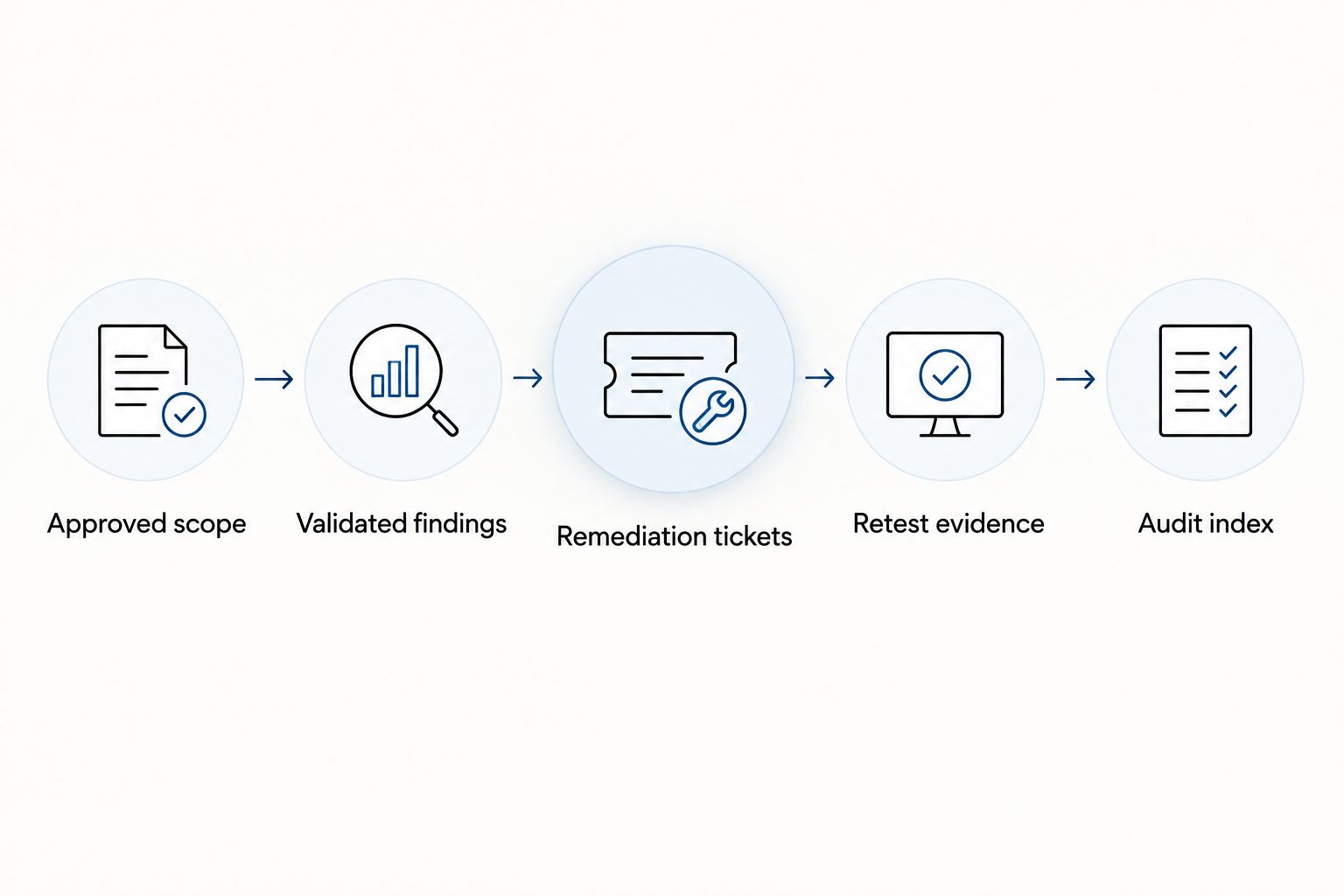
Instead of manually chasing penetration test reports before your SOC 2 audit, connect scope approval, expert-validated findings, remediation tickets and retest evidence in one controlled workflow. Your 2026 SOC 2 audit penetration testing process should demonstrate how you identify and address security weaknesses—not treat a test report as proof of compliance.
- SOC 2 audit penetration testing connects approved scope, validated findings, remediation records and auditor-ready evidence.
- CyberHunter provides human-led, AI-assisted penetration testing; experts direct testing and validate findings.
- SOC 2 does not impose a universal penetration testing requirement; align testing with your controls and auditor expectations.
- Keep vulnerability scanning, penetration testing and the independent SOC 2 examination distinct.
Why this matters
A penetration test and a SOC 2 examination answer different questions. Testing investigates exploitable weaknesses within an agreed scope; the examination evaluates controls against applicable Trust Services Criteria. A report alone does not establish that your organization resolved findings or operated its controls throughout the relevant period.
CyberHunter is best for teams seeking human-led, AI-assisted penetration testing with expert-validated findings and practical remediation guidance. Start by matching the testing engagement to your system boundaries, rather than selecting security services based only on an audit deadline.
For a 2026 examination, distinguish these activities before assigning work:
| Activity | Best for | Strength | Limitation |
|---|---|---|---|
| Vulnerability scanning | Identifying potential weaknesses across assets | Repeatable checks support ongoing monitoring | Results require validation and do not establish an attack path |
| Penetration testing | Investigating exploitability within authorized boundaries | Validated evidence explains practical exposure | Findings apply to the tested scope and conditions |
| SOC 2 examination | Independent evaluation of controls against applicable criteria | Produces an independent auditor's report | Does not replace technical security testing |
Before you start
- Confirm audit boundaries and evidence expectations. Have your system description, applicable controls, examination dates and an auditor contact. Ask how the auditor expects testing and follow-up records to support the examination.
- Obtain testing authorization and operational access. Identify asset owners, authorized targets, exclusions, test accounts, emergency contacts and third-party permissions. Confirm who can approve testing and stop it if necessary.
- Resolve the timing trap. A Type II examination addresses control operation over a period. A test completed after that period does not automatically demonstrate that the control operated during it; agree on timing before scheduling.
Scope and evidence configuration
Use your existing document repository and ticketing system. The bold labels below are suggested record fields—not buttons or settings in a particular software product.
- Record the audit boundary. Create System boundary and Examination period fields. Describe the service, supporting infrastructure, relevant environments and systems excluded from testing. Record the actual dates rather than assuming the calendar year is the examination period.
- Map testing to a control. Add Control reference, Control owner and Testing rationale. Explain which risk the test addresses and how its results feed remediation. Do not claim that every Trust Services Criterion requires penetration testing.
- Define technical coverage. Populate Authorized targets, Test approach, Account roles and Exclusions. Specify whether coverage includes internet-facing infrastructure, applications, APIs, internal networks or cloud configurations. Select coverage from the system's actual architecture.
- Approve the rules. Record Authorization, Test window, Emergency contact and Stop conditions. Set boundaries for disruptive techniques, sensitive-data handling and permitted evidence collection. Obtain any necessary hosting-provider or third-party approvals.
- Agree on evidence handling. Assign an Evidence location, access restrictions and a retention rule consistent with your organization's requirements. Decide how the auditor will receive records without exposing credentials or unnecessary sensitive information.
Expected result: You have an approved scope that connects technical targets to the system under examination, with named decision-makers and agreed evidence requirements.
Make the boundary readable without a meeting. An asset list that says only “production” leaves testers and auditors interpreting different systems; identify the application, environment and relevant dependencies explicitly.
Findings and remediation configuration
CyberHunter penetration testing uses expert direction and validated findings. Your internal workflow should preserve that distinction: a scanner alert is an input to investigation, not automatically a confirmed penetration testing finding.
- Request actionable finding records. Define Finding ID, Affected asset, Technical evidence, Business impact and Recommended remediation. Ask for enough detail to understand the issue and reproduce it safely within authorized conditions.
- Separate validation from severity. Record Validation status separately from Severity. A severe-looking automated alert still needs investigation; an exploitable issue also needs a severity assessment grounded in its context.
- Create a remediation ticket. Link each confirmed finding to a ticket carrying its Finding ID. Assign 1 accountable owner per finding, even when several teams contribute to the fix. Ownership should identify who drives resolution, not merely a shared queue.
- Set a target date. Record Target date, Remediation plan and Risk rationale. Base deadlines on your policies and the finding's exposure, exploitability and business consequences. Do not invent an audit-wide deadline that your controls do not specify.
- Preserve status history. Record assignment, remediation, verification and exception decisions. Keep the original finding intact, with updates linked to it rather than overwriting the initial evidence.
Expected result: Every confirmed finding has an accountable owner, a documented decision and a traceable path from technical evidence to remediation.
Keep 2 evidence layers: the technical finding and the management response. The first explains what testing established; the second shows what your organization did about it. Together, they make the record useful beyond the audit.
Retest and closure configuration
A completed engineering ticket records work performed. It does not, by itself, demonstrate that the original exploit path no longer works. Build verification into the workflow before findings begin arriving.
- Define closure evidence. Add Verification method, Verification owner and Verification result. Specify whether the finding needs a targeted retest, configuration review or another appropriate validation method. Confirm retesting scope and terms with the provider.
- Record the deployed change. Attach the change reference, deployment date and affected environment. A fix in a development branch is not evidence that the production exposure changed.
- Retest the original condition. Where authorized and appropriate, repeat the relevant verification against the affected environment. Record what was tested and any limitations; do not expand testing into unapproved systems.
- Use explicit closure states. Distinguish 3 closure states: Verified remediation, Risk accepted and Not reproduced. Keep unresolved work open. A finding that cannot be reproduced is not automatically proven fixed.
- Approve exceptions separately. For accepted risk, record the decision-maker, rationale, compensating controls and review date. Preserve the technical finding so the acceptance decision does not erase the original evidence.
Expected result: Each finding's final status has supporting evidence, and exceptions remain visible rather than disappearing into completed tickets.
For your 2026 audit evidence, separate the date a fix was deployed from the date it was verified. That distinction explains an otherwise confusing gap when remediation happens near the examination period's end.
Audit evidence configuration
The audit package should explain the process without forcing an auditor to reconstruct it from email. Keep a concise index that points to controlled source records.
- Build the Audit index. Include approved scope, authorization, methodology, report date, findings register, remediation records and verification evidence. Identify the system and examination period covered.
- Connect records using identifiers. Carry the same Finding ID through the report, remediation ticket and retest record. Use stable references instead of filenames that change with every export.
- Document limitations. State inaccessible targets, excluded techniques, unavailable account roles and other coverage restrictions. Explain their effect on the testing objective and record any approved follow-up.
- Control auditor access. Share the necessary evidence through an approved channel. Retain originals, limit unnecessary sensitive content and track what was supplied.
- Reconcile open work. Compare the report against the ticket register and exception log. Explain unresolved findings and their current treatment rather than presenting an incomplete closed-only list.
Expected result: The auditor can trace scope, testing, management response and verification without assuming that a clean-looking report means every issue was resolved.
Repeat the workflow when your system changes
An annual calendar is not the only reason to revisit testing. Significant changes to authentication, authorization, exposed services or system boundaries deserve a documented assessment of whether existing coverage still answers the relevant risk questions.
For a release-driven variant, add a Security testing impact decision to change approval. Record the affected assets, changed security assumptions and decision-maker. If additional testing is warranted, route it through the same authorization, finding and verification records rather than creating a disconnected release checklist.
When comparing penetration testing services, evaluate whether the proposed scope covers changed access controls and exposed interfaces; a provider comparison does not establish what your particular engagement includes. Confirm those boundaries in the approved scope.
Keep the 2026 audit trail continuous: link the change decision to any supplemental testing, then link new findings to remediation. This records why testing expanded—or why the existing scope remained appropriate—without pretending every release requires the same engagement.
The trade-off is administrative work. Trigger-based testing improves coverage decisions, but it needs someone accountable for reviewing changes and documenting the outcome.
Troubleshooting evidence and testing gaps
The report covers a different system boundary
Compare the report's target list with the approved system description. Document missing assets and determine whether supplemental testing is needed. Do not relabel unrelated testing as coverage for an untested system.
Findings are closed without verification
Reopen or reclassify tickets whose only evidence is a developer's completion note. Attach deployment evidence and perform the agreed validation. If verification remains incomplete, say so in the register.
Automated alerts are presented as validated exploits
Separate scan output from confirmed findings. Request evidence supporting exploitability and describe any limits on validation. Removing duplicates improves readability, but deleting unverified alerts does not establish that the underlying systems are secure.
Testing falls outside the examination period
Give the auditor the actual test and remediation dates. Explain what evidence exists from within the period and agree on how later testing will be treated. Never backdate a report or imply later work occurred earlier.
Audit evidence exposes sensitive information
Remove unnecessary secrets and personal information from the sharing copy while retaining controlled originals. Preserve enough technical context for review, and document redactions that affect interpretation. If testing exposed live credentials, follow your incident and credential-handling procedures.
Customize your workflow
Use a single findings register across relevant testing activities, but keep each record's source visible. Penetration testing, vulnerability assessments and threat hunting have different objectives; combining their tickets should not blur what each activity established.
For your 2026 operating process, add recurring reviews of overdue remediation, expiring risk acceptances and material scope changes. Use the resulting decisions to update testing coverage and control documentation—not simply to produce another status report.
CyberHunter provides penetration testing, vulnerability assessments and cyber threat hunting. Talk To Us about the system boundary, testing objectives and evidence your organization needs; agree on deliverables and retesting terms before the engagement begins.
FAQ
Is penetration testing mandatory for SOC 2?
SOC 2 does not impose a universal penetration testing requirement on every organization. Determine the testing needed from your risks, applicable controls, commitments and auditor expectations; a penetration test does not guarantee a successful examination.
Can a vulnerability scan replace a penetration test for a SOC 2 audit?
A vulnerability scan does not establish the same evidence as a penetration test. Scanning identifies potential weaknesses, while penetration testing investigates exploitability within an authorized scope; agree on which evidence your controls require.
When should penetration testing happen before a SOC 2 audit?
Schedule penetration testing around the relevant examination period and leave time to address findings. For Type II reporting, agree with the auditor how testing dates and follow-up evidence support evaluation of controls over the period.
What penetration testing evidence should I give my SOC 2 auditor?
Provide the agreed scope, testing report, findings register, remediation records and relevant verification evidence. Include limitations and unresolved findings, and share sensitive technical material through an approved channel.
Do all penetration test findings need to be fixed before the audit?
An open finding does not automatically determine the audit outcome. Record its severity, treatment, owner and supporting rationale; the auditor evaluates the relevant controls and evidence rather than applying a universal zero-findings rule.
Does CyberHunter offer fully autonomous penetration testing?
CyberHunter describes its penetration testing as human-led and AI-assisted, not fully autonomous. Experts direct testing and validate findings, with an emphasis on exploitable issues and practical remediation guidance.
Do I need another penetration test after an application update?
Assess whether the update changes relevant risks or makes prior coverage insufficient. Document the decision and obtain authorization for any additional testing, especially when authentication, authorization or exposed interfaces change.
One last thing
A risk acceptance closes a decision, not a vulnerability. Keep accepted findings visible with a named decision-maker and a review date. Otherwise, a tidy ticket queue can conceal an unresolved technical exposure.
Related guides
- Penetration testing as a service providers
- Web application penetration testing companies
- Cyber security audit firms in Canada
