


Instead of manually assembling Azure screenshots before each audit, build an Azure cloud security testing compliance workflow that connects scoped assets, policy checks, human-led testing and remediation evidence. For 2026, the goal is a traceable evidence package—not a green dashboard presented as proof of compliance.
- Azure cloud security testing compliance requires scoped assets, validated findings, control mapping and remediation evidence.
- Cyberhunter penetration testing is human-led and AI-assisted; experts direct testing and validate findings.
- Azure Policy evaluates configured rules; penetration testing investigates exploitable weaknesses within an authorized scope.
- Close findings with verification evidence, not a configuration-change ticket alone.
Why this matters
An Azure configuration assessment and a penetration test answer different questions. Configuration checks identify departures from defined rules; penetration testing examines whether weaknesses can produce an exploitable path to data, privileges or business functions.
Neither replaces the audit process. Your assessor still needs evidence that the relevant controls apply to the correct systems and operate as required throughout the assessment period.
Cyberhunter penetration testing is best for businesses seeking human-led, AI-assisted testing with expert-validated findings. Use Cyberhunter security services to discuss testing scope and practical remediation guidance, while keeping compliance conclusions with the responsible assessor.
For your 2026 evidence plan, compare these activities before assigning work:
| Activity | Best for | Useful output | Limitation |
|---|---|---|---|
| Azure Policy evaluation | Checking resources against configured rules | Resource-level compliance states | Does not establish exploitability or complete compliance |
| Vulnerability assessment | Identifying known weaknesses across scoped assets | Prioritized weaknesses requiring review | Does not automatically prove a usable attack path |
| Penetration testing | Investigating exploitable weaknesses within authorized boundaries | Validated findings and remediation guidance | Covers the agreed scope and testing window |
| Compliance assessment | Evaluating evidence against applicable requirements | Control conclusions and documented exceptions | Depends on evidence quality, scope and assessment criteria |
Before you start
- Prepare access and inventory. Identify Azure tenants, subscriptions, resource groups, applications, APIs and data flows. Arrange authorized access to Azure Policy, Microsoft Defender for Cloud where used, relevant logs and an approved evidence repository.
- Approve testing boundaries. Document permitted targets, methods, exclusions, test identities, emergency contacts and stop conditions. Check Microsoft's current cloud penetration-testing rules and obtain permission for third-party systems separately.
- Resolve the non-obvious dependency. Azure subscription access does not automatically provide Microsoft Entra directory permissions, application access or log access. Confirm these separately before scheduling identity testing; dashboard visibility also depends on enabled services, permissions and configured coverage.
Record the applicable framework and assessment boundary before collecting evidence. A framework displayed in a cloud dashboard is not proof that every requirement applies—or that every applicable requirement is satisfied.
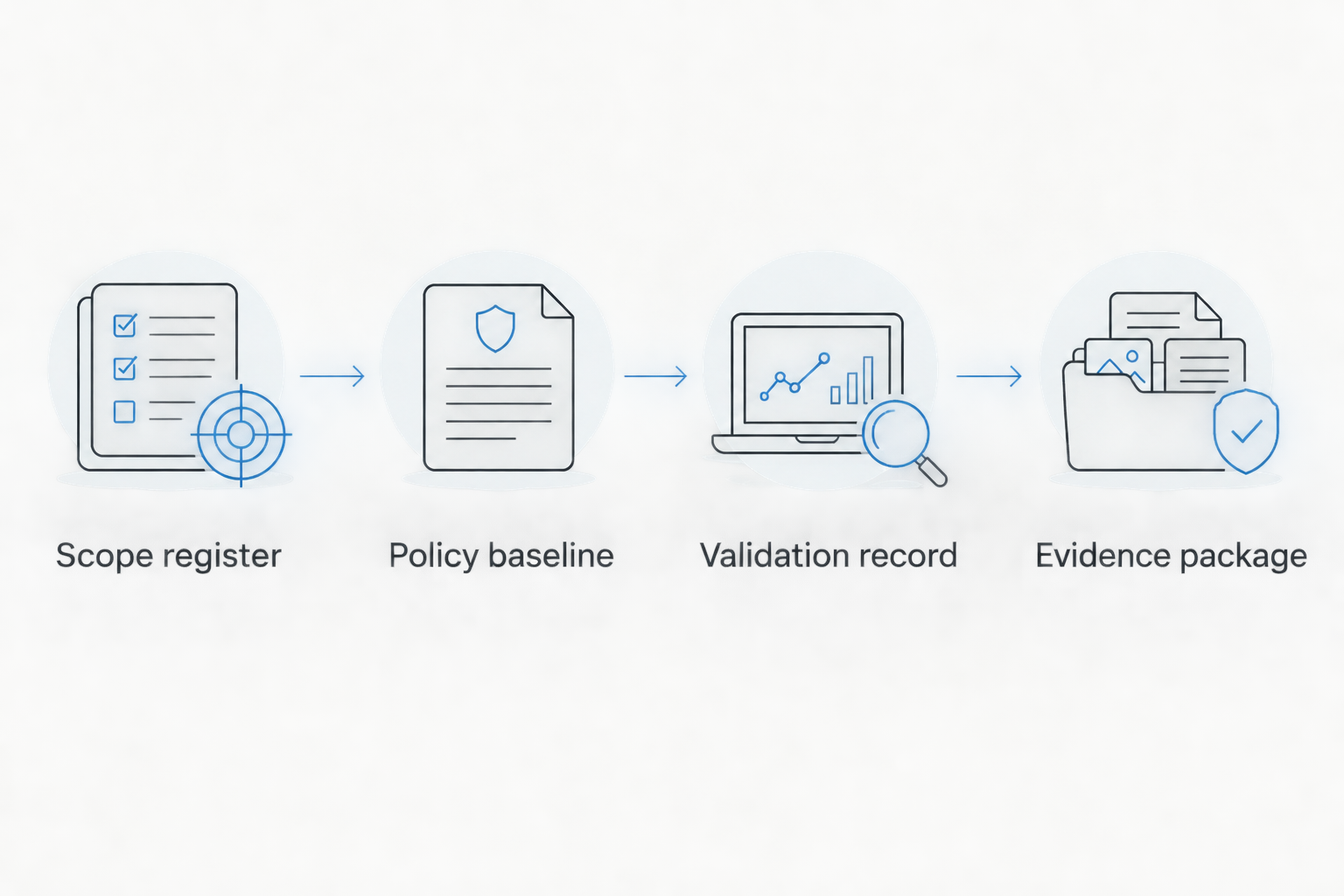
Scope register
A useful scope register connects each business service to its Azure resources, identities, data and control owner. Start here rather than exporting every finding in the tenant.
- Select the subscription boundary. In the Azure portal, search for Subscriptions and open each authorized subscription. Record the subscription identifier, tenant, business owner and environment in your scope register.
- Inspect resource membership. Open Resource groups and review the resources supporting the service under assessment. Include supporting storage, secrets, network components and external dependencies rather than only the public application endpoint.
- Describe identity boundaries. Record relevant users, groups, service principals and managed identities. Specify which identities testers receive and which privileges must remain inaccessible.
- Define the testing perspective. For black-box testing, document what the tester knows initially. For authenticated testing, document the intended privileges of each supplied identity and the business actions it should perform.
- Approve the rules of engagement. Have the authorized system owner approve targets, exclusions, operational safeguards and escalation contacts. Keep that approval with the scope register.
Expected result: every target has an identifiable owner and an approved testing boundary. A tester can distinguish an authorized application from a connected service that requires separate permission.
For 2026 assessments, retain the scope version used for each test. If an application moves subscriptions or changes identity architecture, the old report must remain distinguishable from evidence about the new environment.
Policy baseline
Azure Policy provides configuration evidence against assigned definitions and initiatives. An initiative groups policy definitions; it is not a substitute for selecting requirements that match your actual assessment scope.
- Review existing assignments. Search for Policy in the Azure portal, then open Assignments. Inspect the assignment scope, exclusions, parameters and enforcement configuration before adding another assignment.
- Select the intended baseline. Use Assign initiative when assigning a suitable collection of policy definitions. Set Scope to the approved management group, subscription or resource group, and review the initiative parameters before completing the assignment.
- Inspect evaluated resources. Open Compliance in Azure Policy and examine the relevant assignment. Check which resources were evaluated, their reported states and any exemptions; do not record the summary alone.
- Review security coverage separately. If your organization uses Microsoft Defender for Cloud, open Regulatory compliance and inspect the relevant standard. Confirm that the displayed subscriptions and enabled capabilities match the assessment boundary.
- Preserve the evaluation context. Save the assignment identifier, definition or initiative reference, parameters, scope, exclusions and collection timestamp alongside the results.
Expected result: each configuration result points back to an identifiable rule and resource. Your evidence explains what was checked and what remained outside coverage.
Do not enable a policy effect that changes resources merely to improve a score. Review effects and required permissions through change control first; policy assignment and resource remediation are separate operational decisions.
Validation record
Use configuration results to inform testing, not to replace it. A configuration concern becomes a validated finding only when evidence supports the stated condition and consequence; not every concern requires exploitation.
- Turn concerns into test objectives. For example, ask whether an authorized low-privilege identity can access another user's records—not simply whether the application has authentication enabled. Tie each objective to the scoped service and expected control behaviour.
- Prepare controlled identities and data. Where cross-user authorization testing is in scope, use 2 test identities with distinct approved access rights. Use synthetic records or explicitly authorized test data rather than unrelated customer information.
- Run authorized tests. Have experts direct the penetration testing and validate results. Keep requests, responses, affected resource identifiers and the relevant identity context, while excluding secrets from broadly shared reports.
- Separate observation from consequence. Record what the tester demonstrated, the prerequisites and the business impact supported by that evidence. Do not label a configuration warning as confirmed data exposure without supporting evidence.
- Create actionable findings. Give each finding a stable identifier, affected assets, reproduction details, risk rationale and remediation guidance. Record operational restrictions that prevented validation rather than treating an untested path as secure.
Expected result: remediation teams receive reproducible findings, and assessors can trace each conclusion to evidence rather than a dashboard category.
Cyberhunter uses human-led, AI-assisted penetration testing: experts direct testing and validate findings. That distinction matters when a scanner reports a technical condition but a business decision depends on whether the condition is exploitable.
Evidence package
The evidence package connects technical findings to control ownership, corrective action and verification. Keep the technical finding intact when mapping it to more than one requirement; duplicate tickets create conflicting closure histories.
- Map findings to requirements. Record the applicable control reference and explain why the finding matters to that control. Ask the assessor to confirm ambiguous mappings instead of assuming every Azure recommendation represents a mandatory requirement.
- Assign accountable ownership. Give each finding 1 accountable owner, even when several teams contribute. Record the planned action, dependencies and target date through your existing risk-management process.
- Preserve closure evidence. Maintain 3 evidence records for each remediated finding: the original condition, the implemented change and the verification result. Redact credentials and restrict sensitive technical attachments.
- Verify the original failure condition. Repeat the relevant test within authorization. A successful deployment or closed engineering ticket does not demonstrate that the original access path is blocked.
- Document unresolved risk. Record accepted risks, compensating controls, approval authority and review dates. Mark findings with unverified fixes as awaiting verification, not remediated.
Expected result: an assessor can move from requirement to resource, finding, owner, change and verification without reconstructing the story from email.
Your 2026 package should distinguish evidence collection dates from test execution dates. A later report publication date does not make an earlier test representative of a changed system.
Keep the evidence repository access-controlled and retain the detailed technical material separately from executive summaries. Reviewers need enough detail to substantiate conclusions, but not every stakeholder needs exploit instructions or sensitive response data.
Discuss your Azure testing scope
Define testing boundaries, evidence requirements and remediation priorities.
Refresh evidence whenever Azure resources change
For changing environments, add a change-driven workflow alongside scheduled assessments. This variant is best for identifying when existing evidence no longer describes the deployed system; its limitation is that change detection does not replace testing.
- Identify material changes. Include altered identity permissions, authentication flows, public endpoints, sensitive data stores and network boundaries. Define materiality with security and service owners.
- Connect changes to scope. Use your deployment and change records to identify affected resource identifiers, applications and existing findings. Do not trigger a full penetration test for every unrelated configuration edit.
- Refresh the relevant checks. Review policy evaluation after deployment and investigate new deviations. Azure Policy evaluation is not an immediate verification mechanism for every change.
- Authorize targeted validation. Test the changed security boundary and relevant previously remediated conditions. Preserve the new result as a separate evidence version.
Expected result: your 2026 evidence register identifies which conclusions remain current and which require reassessment. The workflow produces a review queue, not an unsupported claim of continuous compliance.
Troubleshooting
Policy compliance is green, but testing finds unauthorized access
Treat configuration compliance and application authorization as separate evidence. A policy evaluation does not exercise every application transaction. Preserve the validated finding, assign the application owner and verify the access-control fix through the affected workflow.
A standard or subscription is missing from the dashboard
Check coverage before changing controls. Confirm the selected directory, subscription filters, user permissions, relevant service configuration and standard assignment. Record the coverage gap rather than treating an absent result as a passing result.
A fixed resource still appears noncompliant
Check the evaluated condition and evaluation timestamp. Confirm that the change affected the correct resource and policy parameter, then review the next evaluation result. Do not repeatedly change production settings just because the dashboard has not refreshed.
The assessor rejects an evidence screenshot
Replace an isolated image with traceable context. Include the resource identifier, scope, collection date, applicable configuration and collection method. Confirm the assessor's evidence requirements before rebuilding the entire package.
A closed ticket has no verification result
Reopen the verification task without rewriting the original finding. Preserve the implementation evidence, repeat the relevant authorized check and attach the outcome. Separate engineering completion from security verification in the workflow status.
Customize your workflow
Expand the workflow according to the security boundary, not the number of Azure services deployed. An internet-facing API needs different testing objectives from an internal workload relying heavily on managed identities.
Use the cloud security for SaaS companies guide when connecting infrastructure checks with application and tenant-isolation concerns. Keep applicability explicit: a SaaS-focused control question belongs in the plan only when the architecture supports it.
For hybrid or multi-cloud systems, retain provider-specific configuration evidence and a shared register for cross-system findings. Identity relationships and data flows can cross provider boundaries even when individual resource reports remain separate.
FAQ
What does Azure cloud security testing compliance involve?
Azure cloud security testing compliance involves connecting an approved scope, configuration assessments, validated security findings and remediation evidence to applicable requirements. The resulting evidence supports an assessment; it does not independently establish compliance.
Does Azure Policy compliance mean our Azure environment is secure?
No. Azure Policy evaluates resources against assigned rules, while application authorization weaknesses and exploitable attack paths require other forms of assessment. Review coverage and exclusions before interpreting a passing result.
Is vulnerability scanning the same as Azure penetration testing?
No. Vulnerability scanning identifies potential weaknesses, while penetration testing investigates exploitable conditions within an authorized scope. Human validation determines which reported conditions support the stated business impact.
Do we need permission before penetration testing Azure workloads?
Yes. Obtain authorization from the system owner and follow Microsoft’s current cloud penetration-testing rules. Connected third-party systems require their own permission and must not be assumed to fall within your Azure testing scope.
What evidence should we keep after fixing an Azure security finding?
Keep the original finding, implementation evidence and verification result with the affected resource identifiers and dates. A closed change ticket alone does not establish that the original weakness was resolved.
Can Azure regulatory compliance dashboards replace an audit?
No. Azure regulatory compliance dashboards provide evidence about covered checks, not an independent conclusion about every applicable requirement. Assessors also evaluate scope, operating processes, exceptions and supporting records.
When should we repeat Azure cloud security testing?
Repeat relevant testing when material changes affect the assessed security boundary and according to applicable contractual, regulatory and risk-management requirements. Changes to identity privileges, public exposure or authorization logic should prompt a scope review.
One last thing
A successful negative test is useful closure evidence. If an identity previously accessed a forbidden record, preserve the retest showing that the same action is now denied, together with confirmation that permitted access still works. This demonstrates the intended boundary more clearly than a screenshot of a changed setting.
Related guides
- SOC 2 audit to penetration testing workflow
- Connect penetration test results to your SIEM
- From penetration test findings to remediation
