


Instead of manually translating each penetration test finding into isolated firewall edits, use a network penetration testing firewall hardening workflow that connects validated attack paths to approved rule changes, rollback procedures and retest evidence. This 2026 guide shows you how to close unintended access without breaking the connections your business needs.
- CyberHunter connects human-led penetration testing with practical remediation guidance; experts direct testing and validate findings.
- Use this network penetration testing firewall hardening workflow to connect attack evidence, rule changes and retesting.
- Validate both sides of every change: the attack path is blocked and the required business connection still works.
- Firewall hardening controls network access; vulnerable applications and compromised credentials require separate remediation.
Why this matters
A penetration test report identifies security weaknesses; a firewall change controls particular network connections. The handoff fails when you translate a finding into a blocked port without understanding the source, destination, application dependency and attack conditions.
CyberHunter penetration testing is best for businesses seeking human-led, AI-assisted testing with expert-validated findings and practical remediation guidance. Explore CyberHunter’s security services when you need help establishing the testing scope and interpreting exploitable issues.
The workflow below separates discovery, change approval and validation. For your 2026 change process, require evidence that the unwanted connection is blocked and the intended service still works—not just a screenshot showing a saved rule.
Before you start
- Obtain written testing authorization and change authority. Define permitted systems, source locations, techniques, operating windows, stop conditions and emergency contacts. Confirm who can approve and deploy firewall changes.
- Prepare the evidence and recovery materials. Gather validated findings, network diagrams, relevant rules, routing and address-translation details, application dependencies, configuration backups and access to connection logs. Arrange an independent administrative recovery path.
- Resolve the hidden dependency: the tested path must match the enforced path. Proxies, VPNs, translated addresses, cloud controls and alternate routes change what a firewall sees. Map the actual connection before editing a rule, and confirm that testing shared infrastructure is authorized.
Keep sensitive reports, credentials and configuration exports in approved storage. Give each participant the access needed for their assigned task rather than distributing unrestricted administrative access.
Choose the testing scope
External and internal testing answer different questions. Select the scope from the exposure you need to validate, not from whichever scan is easiest to run.
| Testing scope | Best for | Strength | Limitation |
|---|---|---|---|
| External network testing | Validating exposure from outside the organization | Tests reachable services from an agreed external position | Does not establish whether internal segmentation works |
| Internal network testing | Validating access between internal trust zones | Examines reachable services and permitted movement from a defined foothold | Does not replace testing from the public internet |
Vulnerability scanning identifies potential weaknesses through automated checks. Penetration testing uses authorized testing and expert analysis to validate exploitable conditions and attack paths. A security assessment examines a broader set of controls and practices; its scope determines whether exploitation testing is included.
Firewall hardening is a remediation activity. It can restrict access to a vulnerable service, but it does not repair that service’s underlying software defect. CyberHunter penetration testing findings should feed both network changes and the separate remediation work the evidence requires.
Finding-to-rule mapping
Establish the attack path
- Record the tested connection. Capture the finding identifier, source location, destination asset, transport protocol, destination port, observed response and supporting evidence. Distinguish an open port from a demonstrated exploit.
- Map the enforcement points. Trace routing, network address translation, VPN termination, host firewalls and cloud network controls. Identify where the connection should be permitted or denied.
- Identify the business dependency. Ask the service owner which users, systems and integrations need access. Document the required source groups and destinations rather than copying the existing broad rule.
- Assign the remediation owner. Separate the firewall task from patching, credential changes, application authorization fixes or monitoring improvements. Connect related tasks to the same finding.
Expected result: Each validated finding has a documented connection path, a responsible owner and a proposed control change. Findings without sufficient connection evidence return for clarification rather than becoming speculative firewall edits.
Translate ports into business consequences
TCP port 443 commonly carries HTTPS traffic, TCP port 22 commonly carries SSH, and TCP port 3389 commonly carries RDP. These are service conventions, not proof of what a particular host runs or permission to expose those services.
A public web service and an administrative interface can both use HTTPS. Blocking all access to TCP port 443 therefore does not distinguish the intended customer connection from the unintended management connection. Identify the application and administrative path before selecting the control.
Rule design and approval
Define the intended access
- Write the access requirement first. State which source needs to reach which destination, using which protocol and service, and why. Give temporary exceptions an owner and a review condition.
- Compare the requirement with the current policy. Identify unnecessarily broad sources, destinations or services. Check rule order, inherited policy, address objects and overlapping permissions before proposing a replacement.
- Choose the correct enforcement point. Apply the restriction where the relevant source and destination identities are visible. Account for translated addresses and connections that traverse a different gateway.
- Define logging and recovery. Decide which connection events are needed to verify the change, where those events will be reviewed and how the previous configuration will be restored.
- Obtain approval. Have the application owner confirm dependencies and the change approver accept the implementation and recovery plan. Keep the evidence and approval attached to the change record.
Expected result: The approved change describes intended access, enforcement location, affected dependencies, verification checks and recovery actions.
Firewall interfaces use different labels and policy models. Follow the documentation for your deployed platform rather than assuming a vendor-neutral field name matches the management console.
For a 2026 change record, write the expected outcome before implementation: the unauthorized source cannot reach the protected service, while the authorized source retains the required connection. That statement becomes the acceptance test.
Controlled deployment and validation
A saved policy is not evidence of effective enforcement. Your validation must connect the original finding to observed behaviour after deployment.
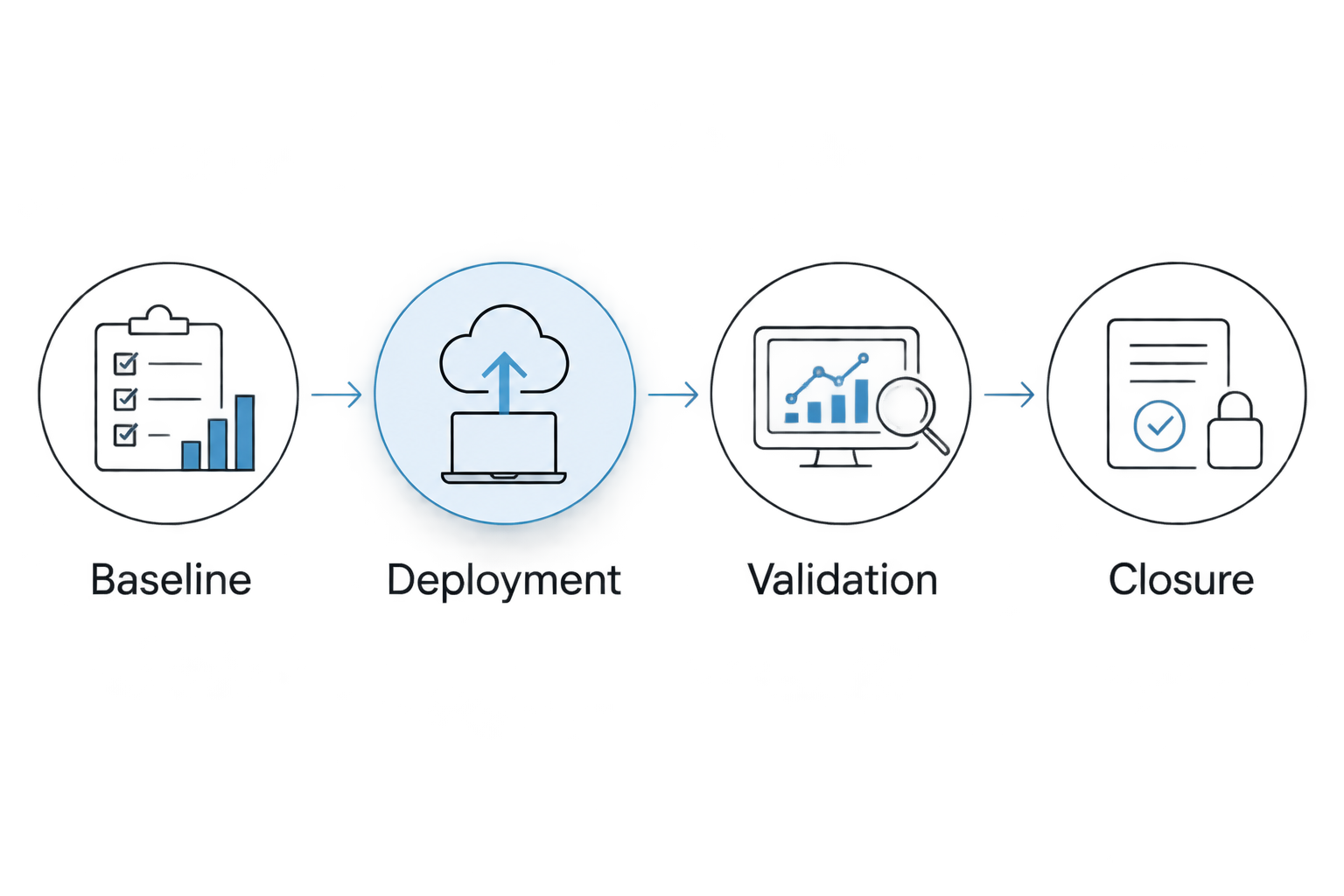
Apply the approved change
- Baseline. Preserve the current configuration and confirm the recovery procedure. Record the original attack condition and the approved business connection using authorized, non-destructive checks.
- Deployment. Apply the approved change through your organization’s change process. Confirm that the active enforcement device received the policy; saving an edit in a management interface is not sufficient.
- Validation. Repeat the relevant test from the agreed source position. Check the destination response and the applicable firewall logs, then confirm that required business connections still succeed.
- Closure. Record the deployed configuration reference, test conditions, outcome, remaining exposure and approving owner. Close only the portion of the finding supported by the evidence.
Expected result: You can show which control changed, which connection was blocked, which necessary connection remained functional and whether the original exploit condition persists.
Keep observation and interpretation separate. A timeout shows that the test did not receive a response; it does not, by itself, identify the firewall as the cause. Use logs and destination checks to distinguish policy enforcement from an unavailable service or routing failure.
Decide whether to retain or reverse the change
Retain the change when it meets the approved security and service checks. If required traffic fails, follow the authorized recovery procedure and investigate the dependency before attempting another policy adjustment.
Do not restore broad access without recording the resulting exposure and obtaining the appropriate approval. An exception should describe the unresolved risk, its owner and the condition that will end it.
Retest evidence and closure
Verify the finding, not just the rule
- Reproduce the original conditions. Use the same authorized source position, target and relevant connection conditions. Document differences that affect comparison with the original test.
- Check alternate authorized paths. Where scope permits, examine whether another permitted route or exposed interface preserves the same attack opportunity. Do not expand testing beyond written authorization.
- Separate containment from remediation. Record a firewall restriction as containment when the vulnerable service remains unchanged. Track the underlying patch or application fix separately.
- Store the closure evidence. Attach the retest result, relevant log evidence, business-function checks and residual-risk decision to the finding.
Expected result: The finding has an evidence-backed status rather than a closure decision based solely on a completed change ticket.
Your 2026 remediation register should distinguish deployed controls from verified outcomes. Use the penetration test findings to remediation workflow to connect network tasks with application, identity and infrastructure fixes.
Revalidate whenever a firewall policy changes
A second workflow starts with a proposed network change rather than a penetration test finding. Use it when publishing a service, changing segmentation or revising remote access.
Before deployment, compare the proposed access with the approved requirement and identify the checks needed to detect unintended exposure. After deployment, verify both the intended connection and the denied connection from their respective source locations.
For your 2026 workflow, attach previous findings affecting those assets to the change review. This gives the approver context about exposure already demonstrated through testing.
Automate evidence collection and change-record updates only where your existing systems support it. Keep authorization, exploit interpretation and closure decisions under accountable human review; this workflow does not require an automatic rule-generation integration.
Troubleshooting
The connection still succeeds after the deny rule
Check policy order, overlapping permissions, the active device and whether the connection traverses that firewall. Inspect translated addresses and existing sessions; some platforms retain established sessions after a policy change. Follow platform guidance before clearing sessions because doing so can interrupt legitimate traffic.
Required traffic stops working
Compare the failed connection with the documented dependency, including source, destination, protocol and return path. Review deny logs and recent routing changes. Use the approved recovery procedure when service acceptance checks fail, then revise the rule from observed dependency evidence.
Firewall logs show no matching event
Confirm that the relevant policy logs the event and that you are reviewing the correct device, time range and source address. Check whether a proxy, VPN or address translation changes the visible source. Missing logs alone do not prove that no connection attempt occurred.
The scanner still reports the vulnerability
Determine whether the scanner reaches the service from a permitted source or is reporting an unchanged software condition. A firewall restriction can reduce reachability without changing the installed software. Record the access-control result separately from the vulnerability’s remediation status.
The retest uses a different source location
Restore the agreed testing position or document why it changed. A failed connection from an unrelated network does not demonstrate that the original attack path is closed. Compare equivalent conditions before assigning a verified status.
Customize your workflow
Extend the same evidence chain to host firewalls, cloud network controls and administrative access paths. Assign each control to an owner and test the complete permitted route rather than treating every device as an isolated fix.
Use CyberHunter when you need experts to direct penetration testing, validate findings and provide practical remediation guidance. Firewall hardening remains one part of that response: patching, identity controls and application changes need their own acceptance evidence.
Discuss Your Testing Scope
Connect penetration testing scope, validated findings and practical remediation priorities.
FAQ
How do I connect network penetration testing to firewall hardening?
Map each validated finding to its source, destination, service and enforcement point, then approve and test a narrowly scoped rule change. Retest the attack condition and verify that required business connections still work.
Is vulnerability scanning enough to validate firewall hardening?
Vulnerability scanning alone does not establish that the original attack path is closed. Combine relevant reachability checks, expert-validated testing, firewall evidence and business-function checks within the authorized scope.
Should I block every port identified in a penetration test?
No. Determine which services are required and which sources need access before changing policy. An exposed port requires context; it is not automatically an exploitable vulnerability.
Does a firewall rule fix the underlying vulnerability?
A firewall rule restricts network access but does not repair an underlying software or application defect. Track access containment separately from patching or other root-cause remediation.
What evidence should I keep after a firewall change?
Keep the approved change, configuration reference, test source and destination, connection results, relevant logs and business-function checks. Record residual exposure and the owner responsible for any exception.
Can penetration test findings automatically generate firewall rules?
Treat generated rules as proposals requiring review, not approved changes. Findings need dependency analysis, enforcement-path mapping, authorization and validation before deployment.
How does CyberHunter approach penetration testing?
CyberHunter provides human-led, AI-assisted penetration testing: experts direct the testing and validate findings. The service emphasizes evidence of exploitable issues and practical remediation guidance.
One last thing
Write the allowed-connection test before writing the deny rule. That forces you to define the business requirement and gives you a clear way to detect an overbroad fix. A blocked attack path matters; proving that the necessary service still works makes the change operationally defensible.
Related guides
- Connect penetration test results to your SIEM
- AWS cloud security testing to compliance-ready workflow
- SOC 2 audit to penetration testing workflow
